Engine sound through your car stereo.
WattGrowl plays its engine through the speakers your car already has. Connect your phone over Bluetooth, USB or a cable, and the Sound Studio puts the exhaust and pops behind you, the intake and turbo in front, and the exhaust bass in the subwoofer.
 iPhone Coming soon
- Bluetooth, USB or cable
- Exhaust behind you
- Subwoofer bass
- Latency compensation
Connect
Hook it up like a playlist.
No amplifier, no extra speakers, no wiring. Any car stereo your phone plays music through will do.
Connect the phone
Bluetooth, USB or an aux cable, whichever your head unit offers, selected as you would for music.
Set the stage
In the Sound Studio pick Car speakers or Car surround, a listening position and a mix, while you are parked.
Drive
Leave the phone in its mount. In Live drive it keeps playing hands-free with the screen off.
Sound stage
The exhaust belongs behind you.
In a gas car the noise comes from two ends: intake and engine up front, tailpipes at the back. The sound stage splits the engine into its parts and puts them back around you.
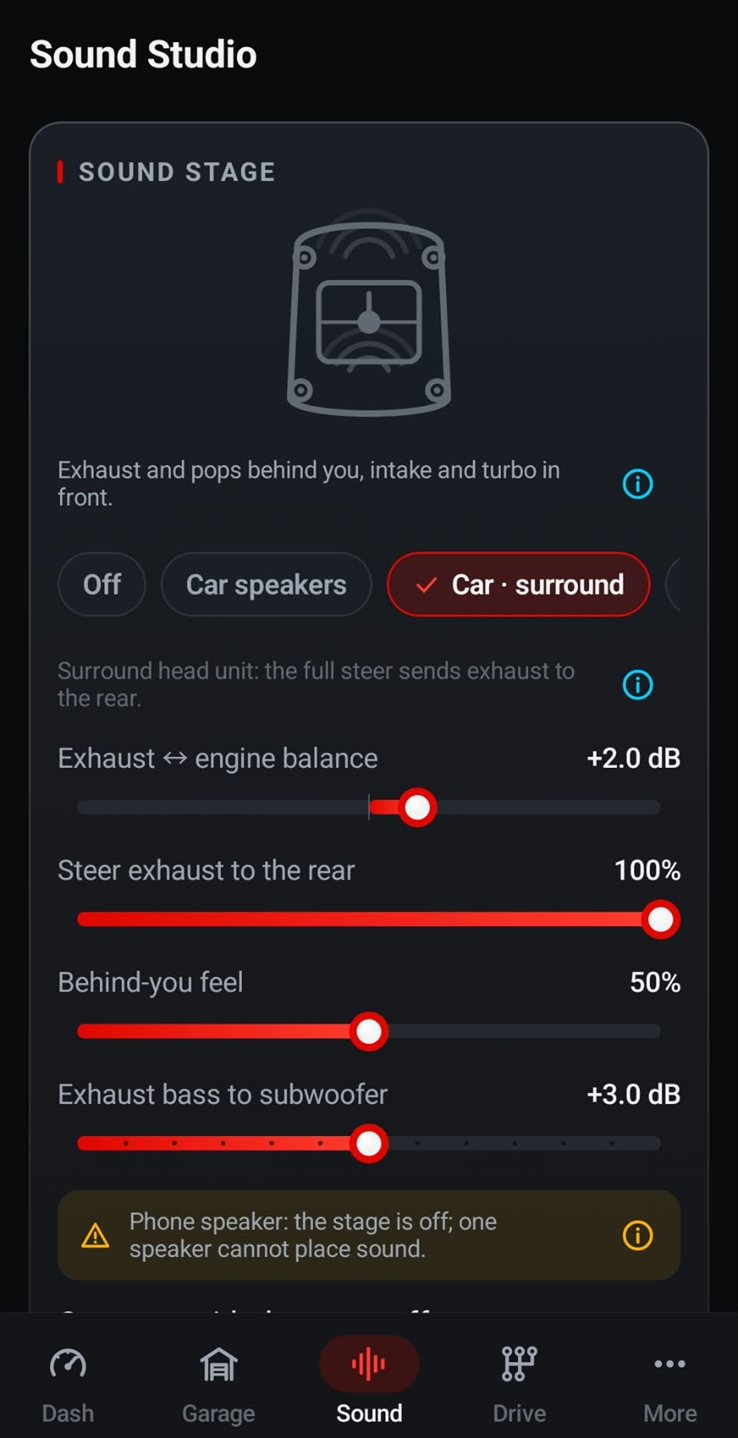
Choose Car speakers for a regular stereo, Car surround for a surround head unit, or Off. Then fine-tune:
- Exhaust ↔ engine balance: more tailpipe or more engine.
- Steer exhaust to the rear: on a surround head unit, the full steer sends it to the rear speakers.
- Behind-you feel: how strongly the exhaust seems to come from behind.
- Exhaust bass to subwoofer: the low rumble goes to the sub, if you have one.
One phone speaker cannot place sound, so there the stage is off.
Listening position
Driver's seat, curbside or under the hood.
The stage decides which speaker plays what; the listening position decides how the engine sounds from where you are:
- Cabin: "Through the firewall: warm, bassy, a little muffled."
- Exterior rear: "Standing behind the tailpipes as it flies by."
- Engine bay: "Hood open: intake roar, valvetrain and belts."
- Onboard race: "Stripped race car with helmet-cam intensity."
Try each one in the free simulator, then keep the one that suits your speakers. For the spool and pssh of a turbo engine, see turbo and blow-off valve sound.

In step and in tune
Plays well with the rest of your audio.
The details that make a synthesized engine work on a real car stereo.
Latency compensation
Automatic, so over Bluetooth the revs rise when the car pulls, not a beat later.
Music and engine together
Music balance and ducking for your playlist.
Mix presets
Stock, Sport, Race and Night (quiet), or your own, plus faders and a three-band equalizer.
Follows your car
It stops with the car audio and starts again when the same car reconnects.
Live output meter
Peak, RMS, limiter and a live spectrum of what goes to the speakers.
Phone speaker and headphones
No stereo? It also plays on the phone speaker or headphones, with a hearing-safety cap on headphone volume.
- Sound Studio and sound stage are free
- Live Drive: 3-day free trial on the yearly plan, then $2.99 a year, or $14.99 once
- For the people inside the car: not a pedestrian warning system or a replacement for AVAS
- Set the volume before you drive and keep it considerate
FAQ
Questions about car speakers
Can I play engine sound through my car speakers?
Yes. Connect your phone over Bluetooth, USB or a cable and WattGrowl plays through the car's speakers like any other audio, on any car stereo.
Is there a delay over Bluetooth?
Bluetooth adds a short delay, and WattGrowl compensates for it automatically, so the engine stays in step with your driving.
Can the exhaust come from the rear speakers?
On a surround head unit, yes: choose Car surround and turn up Steer exhaust to the rear. On a regular stereo, choose Car speakers and use Behind-you feel and Exhaust bass to subwoofer to place the exhaust behind you.
Can I play music and engine sound at the same time?
Yes. Play your playlist as usual; WattGrowl's music balance sets how loud the engine sits against the music, and ducking keeps the two together instead of fighting for the speakers.
What happens when I turn the car off?
In Live drive, the engine stops when the car audio disconnects and starts again when the same car reconnects.
Will people outside the car hear it?
About as much as they hear your stereo at that volume. The sound is for the people inside; it is not a pedestrian warning system and does not replace your car's AVAS.
Explore
More from WattGrowl
Same speakers, a whole new engine.
Set up the sound stage for free in the simulator, then hear it on the road.
iPhone Coming soon
Follow us on Instagram @engine_sound_app for new engines and the iPhone launch.