A free car engine sound simulator for your phone.
Press the gas and hear a V8, a V10 or a rotary climb through the revs. WattGrowl's Drive sim and Garage rev modes are free, and all 37 engines are synthesized live on your phone, not played from recordings.
 iPhone Coming soon
- Free Drive sim
- Garage rev with POP
- 37 engines
- Gas, brake and gears

Drive sim
Pedals, gears and a tach that answers back.
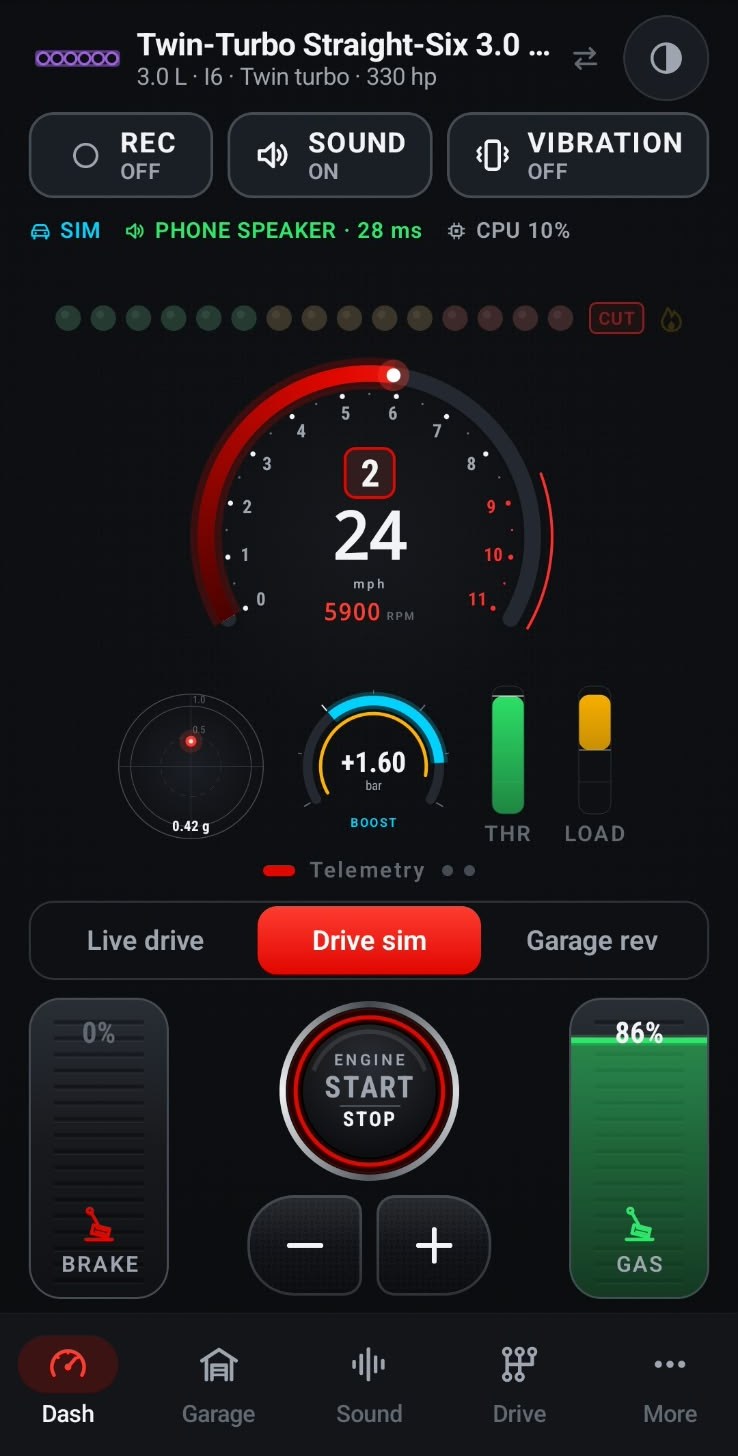
Drive sim puts a brake pedal on the left, a gas pedal on the right and an engine START / STOP button between them. Press the gas and the tach climbs while the shift lights fill from green to amber. Tap + to shift up, − to shift down, or hold it flat into the rev limiter.
The sound is synthesized, so it never loops. The engine model follows rpm and load: a gentle squeeze burbles, a full-throttle pull in third sounds hard at work.
The GEARBOX button above the tach picks how it shifts: Manual, or Automatic with torque-converter, dual-clutch or CVT behavior. Listen on the phone speaker, on headphones with a hearing-safety volume cap, or through a parked car's stereo.
Garage rev, the other free mode, is for blipping the throttle while parked. Tap POP for a backfire.

Dashboard
Gauges that move with the sound.
The dashboard shows what the engine is doing: a tachometer with the gear and speed in the middle, shift lights above it, a boost gauge, a g-meter, and throttle and load bars. On a turbo engine you can watch the boost build as the turbo spools and whistles.
Pick a classic, modern, race or retro theme. Speed reads in mph or km/h, set automatically from your region.
37 engines
Every engine in the garage, free to try.
Filter the Garage by All, Muscle, Euro, JDM or Supercar. None of the engines is a recording: firing order, exhaust pipes, muffler, turbo, supercharger and rev limiter are modeled for each one, so an odd-fire V10 and a twin-rotor rotary sound nothing alike at the same rpm.
Want one angrier? Start from any library engine in the Engine Workshop and change what you like, or dig into the V8 lineup.
- Small-Block V8 5.7 Big Cam: 350 hp, 6,000 rpm
- Supercharged V8 6.2: Roots supercharger, 650 hp, 6,400 rpm
- Four-Cam Muscle V8 5.0: 460 hp, 7,400 rpm
- Odd-Fire V10 8.4: 645 hp, 6,150 rpm
- Big-block V8s, a flat-plane V8 and twin-turbo straight-sixes
- A rally boxer, a hot-hatch four, V12s, a quad-turbo W16, rotaries, diesels and superbikes
From sim to street
Found your engine? Take it for a drive.
Live Drive, the premium mode, turns your real driving into the sound. Try it free for 3 days on the yearly plan, then $2.99 a year, or $14.99 once for life.
Shape the mix
In the Sound Studio, start from the Stock, Sport, Race or Night preset, then move the exhaust, intake, turbo and pops faders.
Connect and mount
Before you pull away, connect the phone to the car stereo over Bluetooth, USB or a cable and put it in a mount. WattGrowl calibrates itself to how it sits.
Select Live drive
The phone's motion sensors and GPS follow how hard you accelerate, brake or coast, hands-free with the screen off. The sound is for the people in the car, not a pedestrian warning.
FAQ
Questions about the simulator
Is there a free engine sound simulator for Android?
Yes. WattGrowl is a free download on Google Play, and Drive sim and Garage rev are free with all 37 engines, the Sound Studio and the Engine Workshop. Only Live Drive, the sound from your real driving, is premium.
Are the engine sounds recordings?
No. Each engine is synthesized live on your phone from a model of its firing order, exhaust, muffler, turbo or supercharger and rev limiter, so the note follows the rpm and load instead of repeating a loop.
How do I rev the engine without driving?
Choose Garage rev on the dashboard and blip the throttle while parked; tap POP for a backfire. Drive sim adds a brake pedal and gear buttons, so you can run up through the gears on screen.
Can I hear the simulator through my car speakers?
Yes. Connect the phone over Bluetooth, USB or a cable and it plays through the car stereo. It also works on the phone speaker and on headphones, where a hearing-safety cap limits the volume. Use the on-screen pedals only while parked.
Do I need an electric car to use it?
Not for the simulator or Garage rev: they run on the phone alone. Live Drive is made for electric cars and works with any EV and any car stereo, with no OBD dongle and no wiring.
Explore
More from WattGrowl
Start revving for free.
Download WattGrowl, open Drive sim and press the gas.
iPhone Coming soon
Follow us on Instagram @engine_sound_app for new engines and the iPhone launch.